How can we help?
Ask our assistant, watch a short walkthrough, or talk to us.
Browse by topic
Pick a topic to see its questions.
Getting startedSign up, your account and settings›Plan my journeyJourney plan, tracker and deadlines›Find countries, universities and programsSearch, compare and shortlist›Scholarships and fundingFind and apply for funding›Prepare my documentsSOP, recommendation letters and CV›Talk to an expertBook a session or hire an expert›Lattu BuddyYour AI assistant›Connect with othersCommunity and mentors›Payments and refundsPay, invoices and refunds›Troubleshooting and technical issuesIf something is not working›
Watch how it works
Short walkthroughs, recorded on the real platform.
Book an advice session
Use the Application Tracker
Use Lattu Buddy
Talk to others planning to move abroad
How Lattu Community works
Popular questions
Quick answers to what people ask most. Not here?
How do I create a journey plan?
Sign up, answer a few questions about your goal, and Lattu builds your plan for you on the Journey Dashboard.
Steps:
- Sign up at lattu.ai, or log in. Signing up is free.
- Answer the questions about what you want to study, which countries you are considering, and where you are in the process right now.
- Lattu builds your personal plan from your answers. Open the Journey Dashboard to see it.
- Start with the first step, or come back any time. Your plan stays saved and updates as you progress.
- To plan another route later, start a new journey.
Your plan, the Journey Dashboard and the Application Tracker are free.
If it does not work: If the questions do not appear or your plan does not load, refresh the page and log in again. If it still fails, contact us from the Support page. You can use the chatbot, send a ticket or email us.
How do I book an advice session?
Open Experts, choose the Get advice tab, click Book a session, pick a session and a time, and pay. Your Session is confirmed the moment your payment is held. The expert does not need to accept it.
Steps:
- Open Experts from the main menu, choose the Get advice tab, and click Book a session on the expert you like. A booking pop-up opens.
- Choose the session you want. Each expert lists their own sessions, with the length and price. Then click Continue.
- Pick a time from the calendar. You can book up to 8 weeks ahead.
- Check your booking on the review step. Add a note about what you want to discuss (optional), and answer any questions the expert set. Then click Continue to payment.
- Enter your phone number if we do not have it yet. We ask once, on your first booking of any kind, and save it to your profile.
- Pay online or by bank transfer. If you have a voucher code, enter it here. You can pay by bank transfer when the Session starts at least 72 hours away (see "How do I pay, and how long is my slot held?"). A free Session books without a payment step.
- You and the expert get a confirmation with the video call link, and an order number.
Your phone number stays with Lattu for an advice Session. Our team may reach out to you on it if needed. The expert does not get it. You can cancel within 1 hour of booking (see "How do I cancel or reschedule?").
If it does not work: If a time you want is not shown, it falls inside the expert's notice period or another student is holding it. Pick another time, or ask us from the Support page.
How do I cancel or reschedule?
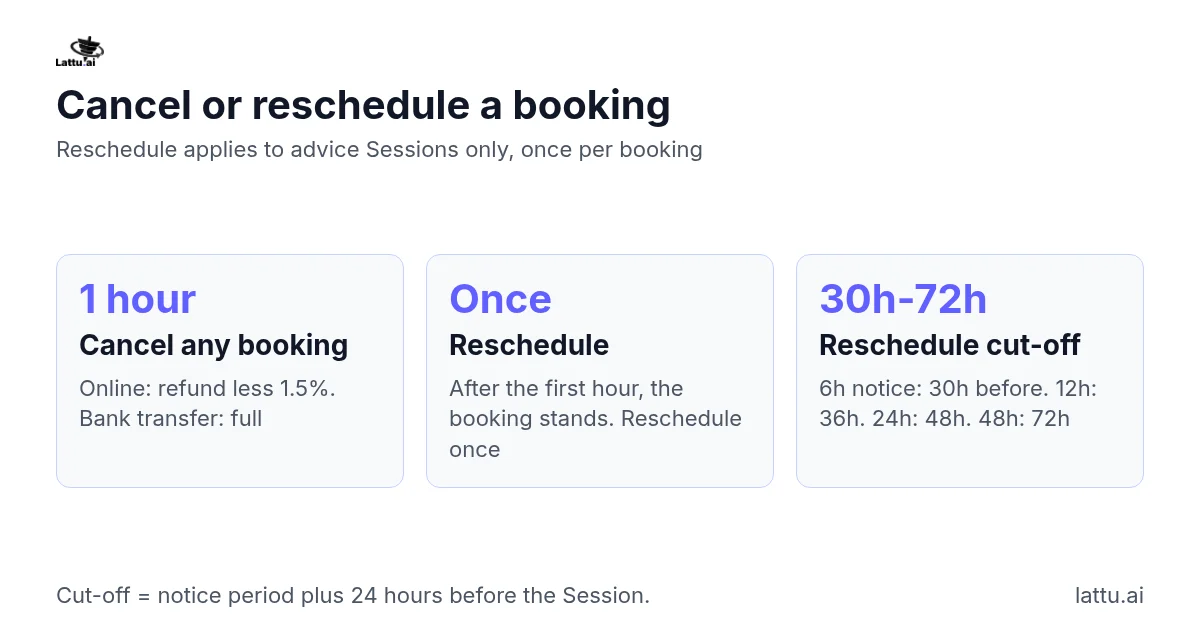
You or the expert can cancel any booking within 1 hour of making it. After that hour the booking stands, but you can reschedule an advice Session once. Canceling within the hour: Open the booking and choose to cancel it. The booking confirmation message also has a cancel option, and the booking page shows the 1-hour window before you pay. If you paid online, we refund you less the 1.5% payment processing fee. If you paid by bank transfer, we refund you in full. The slot is released. If the expert cancels within the hour, we refund you on the same terms. This covers advice Sessions and hired Services. Rescheduling (advice Sessions only):
- Open the booking.
- Pick another open time in the expert's calendar. The new time takes effect at once. The expert does not need to accept.
You can do this once per booking, up to the expert's notice period plus 24 hours before the Session. For a 24-hour notice period, that is 48 hours before. After that point there is no reschedule option and the booking stands. A hired Service has no time slot to move.
If it does not work: If you cannot attend and cannot reschedule, tell us from the Support page. A Session you miss counts as delivered (see "What happens if someone does not show up for a session?").